Samsung Galaxy Y (young) v. 2.3.6 locked from smart

TOOLS Z3X USB CABLES
PROCEDURE
How to root your Samsung Galaxy Y? Below is a step by step procedure:
1. You need to download the file http://www.mediafire.com/?39jc45872cna213
2. Connect your Samsung Galaxy Y to your computer
3. Copy the update.zip to the root of your SD card
Note: If you are accessing this page and downloading the file through your Android phone, then skip step number 2.
4. After you have copied the file update.zip to the root of your SD card, turn off the Galaxy Young.
5. Then turn it ON again, BUT this time go to recovery Mode. Press power, volume up and home button together.
6. Your Galaxy Young will boot into a BIOS like display, choose “apply update from sdcard”. Use volume up and down to scroll, and home screen as enter.

7. Browse through the files and choose update.zip and hit the home button to begin the rooting.

8. Wait until your Samsung Galaxy Y finishes updating.
9. And your done! Your Samsung Galaxy Y S5360 should now be rooted.
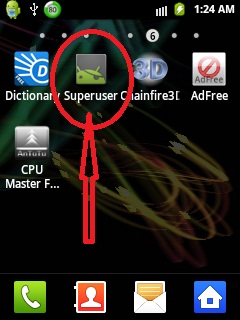
How to know if your Galaxy Young S5360 is already Rooted? You should be able to see the Superuser icon in your Galaxy Y.
Unlock procedure
MAY MAG POP UP NA GANITO PRESS ALLOW


DONE

 |
TOOLS Z3X USB CABLES
PROCEDURE
How to root your Samsung Galaxy Y? Below is a step by step procedure:
1. You need to download the file http://www.mediafire.com/?39jc45872cna213
2. Connect your Samsung Galaxy Y to your computer
3. Copy the update.zip to the root of your SD card
Note: If you are accessing this page and downloading the file through your Android phone, then skip step number 2.
4. After you have copied the file update.zip to the root of your SD card, turn off the Galaxy Young.
5. Then turn it ON again, BUT this time go to recovery Mode. Press power, volume up and home button together.
6. Your Galaxy Young will boot into a BIOS like display, choose “apply update from sdcard”. Use volume up and down to scroll, and home screen as enter.
|
7. Browse through the files and choose update.zip and hit the home button to begin the rooting.
|
8. Wait until your Samsung Galaxy Y finishes updating.
9. And your done! Your Samsung Galaxy Y S5360 should now be rooted.
How to know if your Galaxy Young S5360 is already Rooted? You should be able to see the Superuser icon in your Galaxy Y.
Unlock procedure
MAY MAG POP UP NA GANITO PRESS ALLOW
|
|
Quote:
| Android Version: 2.3.6 Model: GT-S5360 Product Code: Unknown Phone Version: S5360DXLA1 PDA Version: S5360DXLA1 CSC Version: S5360OLBLA1 IMEI: 351863057926194 Checking ROOT... TRUE Reading Data From Phone... OK Please Wait, Calculating Codes... OK (time - 00:00:08) Freeze code: 30906080 NET lock: #7465625*638*30701070# Sub lock: #7465625*782*00000000# SP lock: #7465625*77*00000000# CP lock: #7465625*27*00000000# Multi lock: #7465625*685*00000000# For check lock status: *#7465625# Done with Samsung Tool ver 12.3 |
|

No comments:
Post a Comment